
Last updated: November 2026
What Is SEO Meta Data?
SEO meta data is the information in a page’s code that tells search engines what the page is about. The two parts that matter most are the title tag and the meta description, because Google often shows them as your result in search. The title helps Google understand the page and is a ranking signal. The description does not affect rankings, but it often decides whether someone clicks.
I’m Frasat Ali, an SEO consultant. I have worked in SEO since 2015 and write meta data for every page I publish, for clients and on this site. This guide covers current best practices for 2026, how long titles and descriptions should be, why Google rewrites them, and real before-and-after examples from my own site.
Meta Title vs Meta Description vs Other Meta Tags
Only a few meta tags matter for SEO. The title tag and meta description shape your search result, while the robots and viewport tags control indexing and mobile display.
| Tag | What it does | Affects rankings? |
|---|---|---|
| Title tag | Names the page; usually shown as the blue headline in Google | Yes, as one signal among many |
| Meta description | Summarizes the page; often shown under the title | No, but it affects clicks |
| Meta robots | Tells Google whether to index the page or follow its links | Controls indexing: a noindex tag keeps a page out of search entirely |
| Meta viewport | Makes the page display properly on mobile | Indirectly, through mobile usability |
| Meta keywords | An old list of keywords | No. Google ignores it |
Google lists every tag it understands in its guide to supported meta tags.
Meta Title Best Practices
A good meta title puts the main keyword near the start, describes the page honestly, and stays short enough to show in full. It should read like a headline a person would click, not a list of keywords.
- Lead with the main keyword. Searchers scan the first few words.
- Make every title unique. Duplicate titles make it hard for Google to tell pages apart.
- Match the search intent. A how-to search wants “how to”, a comparison search wants “vs” or “best”.
- Add a specific detail. A number, a year or a result makes a title stand out.
- Add your brand at the end, if there is room. It helps for branded searches.
- Do not stuff keywords. Repeating a phrase makes the title look spammy and can lead Google to rewrite it.
How Long Should a Title Tag Be?
Aim for about 50 to 60 characters. Google does not use a character limit. It cuts titles by pixel width, at roughly 600 pixels on desktop, so wide letters like W and M use more space than narrow ones like i and l.
Google’s guide to title links says there is no fixed length. Still, a title longer than about 60 characters often gets cut off with “…” in search results. Your SEO plugin’s preview bar is the quickest way to check.
Meta Description Best Practices
A good meta description tells searchers exactly what the page gives them and why it is worth clicking, in one or two plain sentences. Think of it as the short ad for your page.
- Summarize the page accurately. A misleading description gets clicks that leave immediately.
- Include the main keyword naturally. Google often bolds the words that match the search.
- Give a reason to click. A specific benefit, number or result.
- Write a unique description for every important page.
- Skip empty hype. Words like “ultimate” or “guaranteed” add nothing, and “guaranteed” is a red flag for SEO services.
How Long Should a Meta Description Be?
Aim for about 140 to 160 characters. Google’s guide to snippets sets no fixed limit and shortens descriptions as needed for the device. Around 150 to 160 characters usually shows in full on desktop. On mobile, the first 120 characters matter most, so put the key point first.
Do Meta Descriptions Affect SEO?
Not directly. Google has said for years that the meta description is not used for rankings, including in its 2009 post on meta tags and ranking. But it still matters, because it influences how many people click your result. More clicks from the same rankings means more traffic without any change in position.
Why Google Rewrites Titles and Descriptions
Google rewrites a title or description when it thinks other text on the page describes it better for that search. This is normal, and it happens to every site.
The most common reasons:
- The title is very long, or repeats keywords
- The title does not match what the page is about
- The same title is used on many pages
- The description is missing, too short or too generic
- Another part of the page matches the search more closely
The fix is usually to make the title and the page’s H1 heading say the same thing clearly. When they agree, Google rewrites far less often.
Do Meta Keywords Still Matter?
No. Google has ignored the meta keywords tag since at least 2009. Google said so directly in its post “Google does not use the keywords meta tag in web ranking”. You can leave it empty. Filling it in only shows competitors your target keywords.
Real Before and After Examples From This Site
These are real titles and descriptions I rewrote on frasatali.com in November 2026, with the reason for each change.
Example 1: A title that was too long
| Text | Length | |
|---|---|---|
| Before | SEO Case Studies 2026: Real Success Stories That Work – Frasat Ali | 66 characters |
| After | SEO Case Studies 2026: Real Client Success Stories | 50 characters |
Why: at 66 characters, the end of the title was likely cut off. The new version keeps both keywords the page ranks for (“SEO case studies” and “success stories”) and drops filler.
Example 2: A description with no reason to click
| Text | |
|---|---|
| Before | Explore real SEO case studies, success stories, and actionable examples that helped websites rank higher and drive organic growth in 2026. |
| After | Real SEO case studies with Search Console data: a medical clinic from 1.11K to 100K+ clicks, local 3-Pack wins, and a new store at 233K+ impressions. |
Why: the old description could fit any SEO website. The new one gives three specific results, which is a much stronger reason to click. The page had over 200,000 impressions but very few clicks, so the description was the easiest thing to improve.
Example 3: A title aimed at the wrong keyword
| Text | |
|---|---|
| Before | Semantic SEO Case Study: How I Took a New Ecommerce Store From 0 to 233K+ Impressions |
| After | Ecommerce SEO Case Study: New Store to 233K+ Impressions |
Why: “ecommerce seo case study” gets far more searches than “semantic seo case study” and is less competitive. The new title leads with it and is short enough to show in full.
I will add the click-through results for these changes once there is enough Search Console data to compare.
A Product Page Example
For an online store selling hair care in Pakistan, I rewrote the product page’s title and description to name the product clearly, include the main benefits and mention the country. The product appeared in third position for its main search.
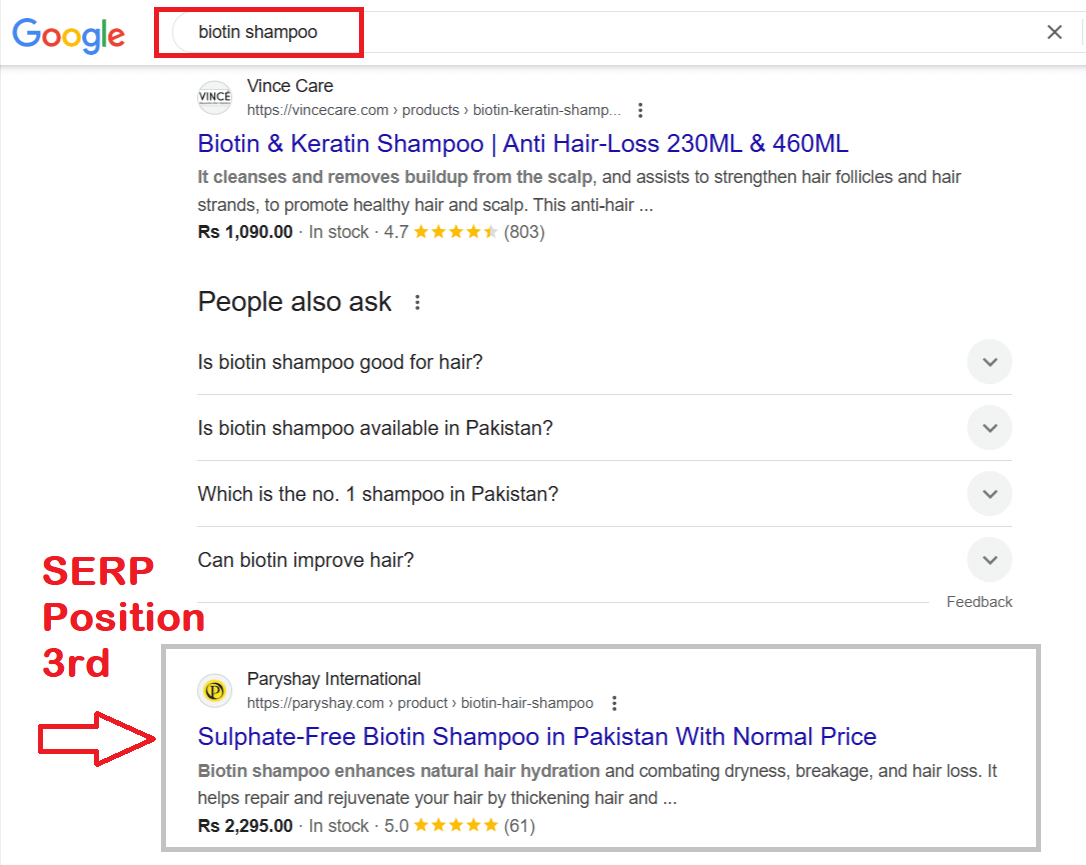
A note on cause: a rewritten description does not raise rankings by itself. The goal of this change was to make the result clearer and more clickable for people who already saw it.
How to Test Meta Data in Search Console
Use Google Search Console to find pages with many impressions but few clicks, rewrite their meta data, and compare the click-through rate after a few weeks.
- Open the Performance report and set the date range to 3 months.
- Open the Pages tab and sort by impressions.
- Look for pages with high impressions and a low click-through rate for their position.
- Rewrite the title and description for those pages.
- Note the date, then request indexing for the page.
- After 4 weeks, use the Compare option to check the click-through rate before and after.
Change only one page’s meta data at a time if you can, so you know what made the difference. This is one step of the Search Console workflow in my SEO checklist.
Frequently Asked Questions
Does the meta title affect rankings?
Yes, as one signal. It helps Google understand the page, but content, links and many other factors matter more.
Should I put the year in my title?
Only when people search with the year, and only if you update the content each year. For this topic, many searches include the year, so this guide uses it.
What happens if I leave the meta description empty?
Google writes its own snippet from your page’s text. That can work, but writing your own gives you more control over what searchers see.
Can two pages have the same meta description?
They can, but it is a missed chance. Each important page should have its own description that explains what makes it different.
Final Thoughts
Good meta data is simple: a clear title that matches the search, a description that gives a real reason to click, and the same message on the page itself. Write it once, then check Search Console and improve the pages that get seen but not clicked.
For page templates you can copy, including meta descriptions, see my website content writing examples. If you want help with your own site, contact me.

SEO consultant with 11+ years of experience helping e-commerce, legal, medical, and local service businesses in 30+ countries, mostly the US, UK, Canada, and Australia, get found on Google, Bing, and AI search engines like ChatGPT, Perplexity, and Claude. Every case study on this site uses real data from the project’s Google Search Console, Analytics, or Semrush. Learn more about me, read my SEO case studies, or work with me.

