
Last updated: November 2026
To rank higher on Google Maps, you need to improve the three things Google says decide local results: relevance, distance and prominence. In practice, that means a complete and accurate Google Business Profile, the right primary category, consistent business details across the web, a steady flow of genuine reviews, and a website with a page for each service and area you cover. Every step in this guide is free.
I’m Frasat Ali, an SEO consultant. I have worked in SEO since 2015, and local SEO for service businesses, clinics and law firms is a large part of my work. This guide follows Google’s own local ranking factors, step by step.
What Is Google Maps SEO?
Google Maps SEO is the work of making your business appear higher in Google Maps and in the “map pack”, the three local results shown with a map at the top of many Google searches. Most of it happens in your Google Business Profile, with support from your website and other sites that mention your business.
The map pack matters because people searching there usually want to call, visit or book right away. A business in the top three gets far more of those actions than one lower down.
Google Maps Ranking Factors: Relevance, Distance and Prominence
Google says local results are based mainly on three factors: relevance, distance and prominence. You can improve two of them. The third, distance, you can only work with.
| Factor | What Google looks at | Can you change it? |
|---|---|---|
| Relevance | How well your profile matches what someone searched for | Yes: categories, services, description, website |
| Distance | How far your business is from the searcher or the location in the search | No, but you can set your service areas correctly |
| Prominence | How well known your business is: reviews, links, articles, directories and your position in regular web results | Yes: reviews, citations, local links, your website |
This comes from Google’s own help page, tips to improve your local ranking on Google. The steps below are grouped by these three factors.
How to Improve Relevance
Relevance improves when your Google Business Profile describes exactly what you do, in the words customers search for.
1. Choose the Most Accurate Primary Category
The primary category tells Google what your business is. Choose the most specific one that fits, such as “Family Law Attorney” rather than just “Lawyer”. Add secondary categories only for services you really offer.
2. Use Your Real Business Name
Do not add keywords or city names to your business name unless they are part of your real name. Google’s guidelines for representing your business do not allow it, and profiles with stuffed names can be suspended.
3. Fill In Every Section
Add your services, products, hours, attributes, booking link and a plain description of what you offer and where. Every complete section gives Google more information to match your profile to searches.
4. Build a Page for Each Service and Area
Link your profile to a website with a page for each main service and each area you cover. Your website helps Google confirm what you do and where. See my location page template for an example of what to write.
How to Work With Distance
You cannot change how far a searcher is from your business, so you cannot rank at the top everywhere. A business usually ranks best in the area around its location, and lower the farther a searcher is.
- Set your address correctly if customers visit you.
- If you visit customers instead, such as a cleaner or a mover, hide your address and set your service areas. My guide to local SEO for service area businesses shows how this worked for two real clients.
- Do not create fake locations or virtual addresses to appear in other towns. It breaks Google’s guidelines and can get the profile removed.
How to Improve Prominence
Prominence improves when more people review, mention and link to your business. Google says review count and rating, links, articles and directories all count toward prominence, and so does your position in regular web results.
5. Get Reviews Steadily
Ask every happy customer for a review, right after the job, with a direct link to your review form. A steady flow over months looks more natural than a sudden burst. Never pay for reviews or offer rewards for them, which Google does not allow.
6. Reply to Every Review
Google recommends responding to reviews. Thank people for good reviews, and answer bad ones calmly with a way to fix the problem. Future customers read the replies too.
7. Keep Your Business Details the Same Everywhere
Use the exact same name, address and phone number (NAP) on your website, directories and social profiles. List the business on major directories such as Apple Maps, Bing Places and Yelp, plus directories for your industry.
8. Earn Local Links and Mentions
Local news, city guides, “best of” articles, sponsorships and industry sites all build prominence. My off-page SEO strategy guide shows how five local features moved a Toronto cleaning company from page 4 to page 1.
9. Strengthen Your Website
Google says your position in regular web results also counts toward local prominence. A fast website with clear service pages helps your Maps rankings as well as your organic rankings.
Quick Wins You Can Do Today
These five changes take under an hour and cost nothing.
| Task | Time |
|---|---|
| Check that your primary category is the most specific one | 5 minutes |
| Check your hours, including holiday hours | 5 minutes |
| Add your main services and a booking link | 15 minutes |
| Upload recent photos of your work, team or location | 15 minutes |
| Send your review link to your last five happy customers | 10 minutes |
What Does Not Help (or Can Hurt)
- Keywords in your business name that are not your real name. It can get the profile suspended.
- Fake or paid reviews. Google removes them, and repeated violations can hurt the profile.
- Fake addresses in towns where you have no real location.
- Expecting posts alone to move rankings. Google Business Profile posts can help customers, but Google has not confirmed them as a ranking factor.
How to Track Your Google Maps Rankings
Track two things: where you rank in different parts of your area, and what customers do on your profile.
- Business Profile performance: calls, direction requests and website clicks, inside your Google Business Profile
- Local rank tracking: a grid-based local rank tracker shows how your position changes across your area, since Maps rankings depend on where the searcher is
- Website traffic from Maps: add tracking (UTM) parameters to the website link in your profile, so you can see those visits in Google Analytics
Real Results From These Steps
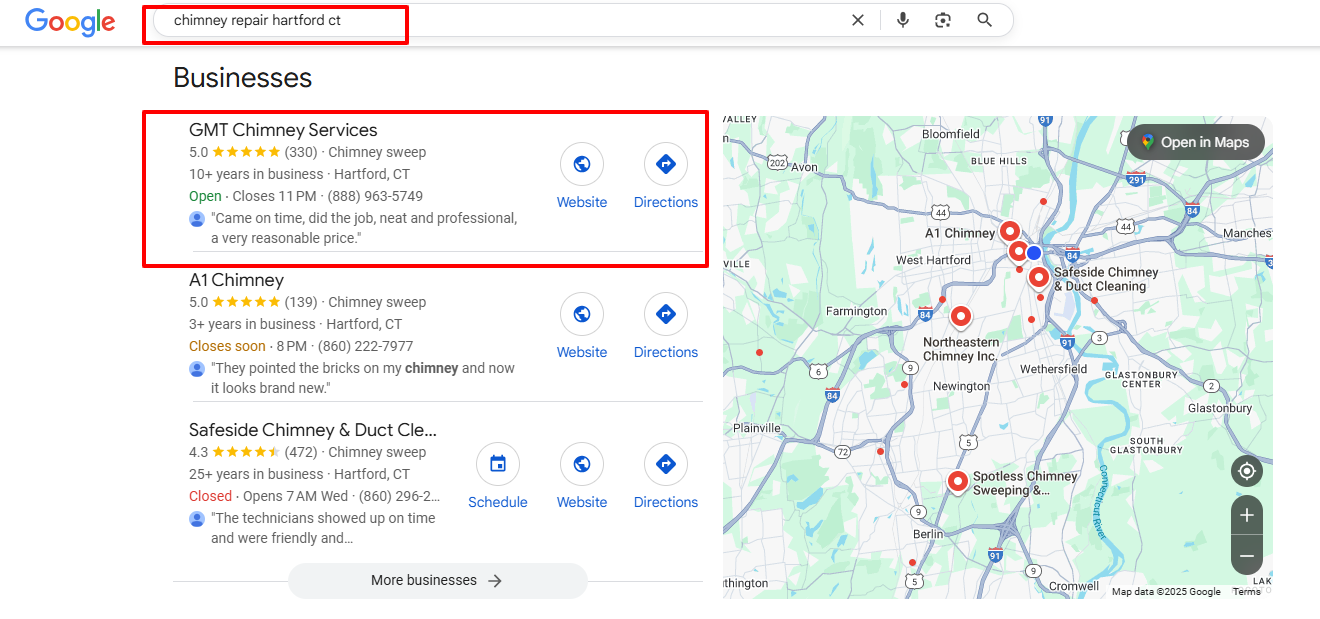
These steps have put clients at the top of the Google map pack in the US, Canada and Singapore. A chimney company in Hartford, Connecticut, and a moving company in Fort McMurray, Alberta, both reached the 3-Pack for their main local searches in about three months.
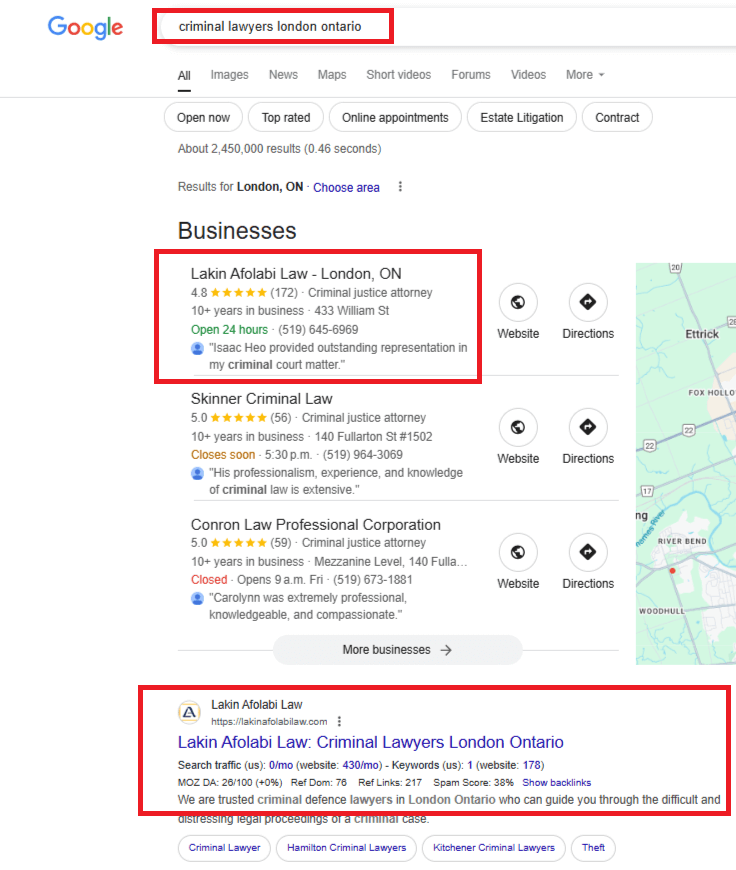
A criminal law firm in London, Ontario ranked first in the map pack for “criminal lawyer london ontario”. When I re-checked in November 2026, it was still first for both “criminal lawyer london ontario” and “criminal lawyer london”.
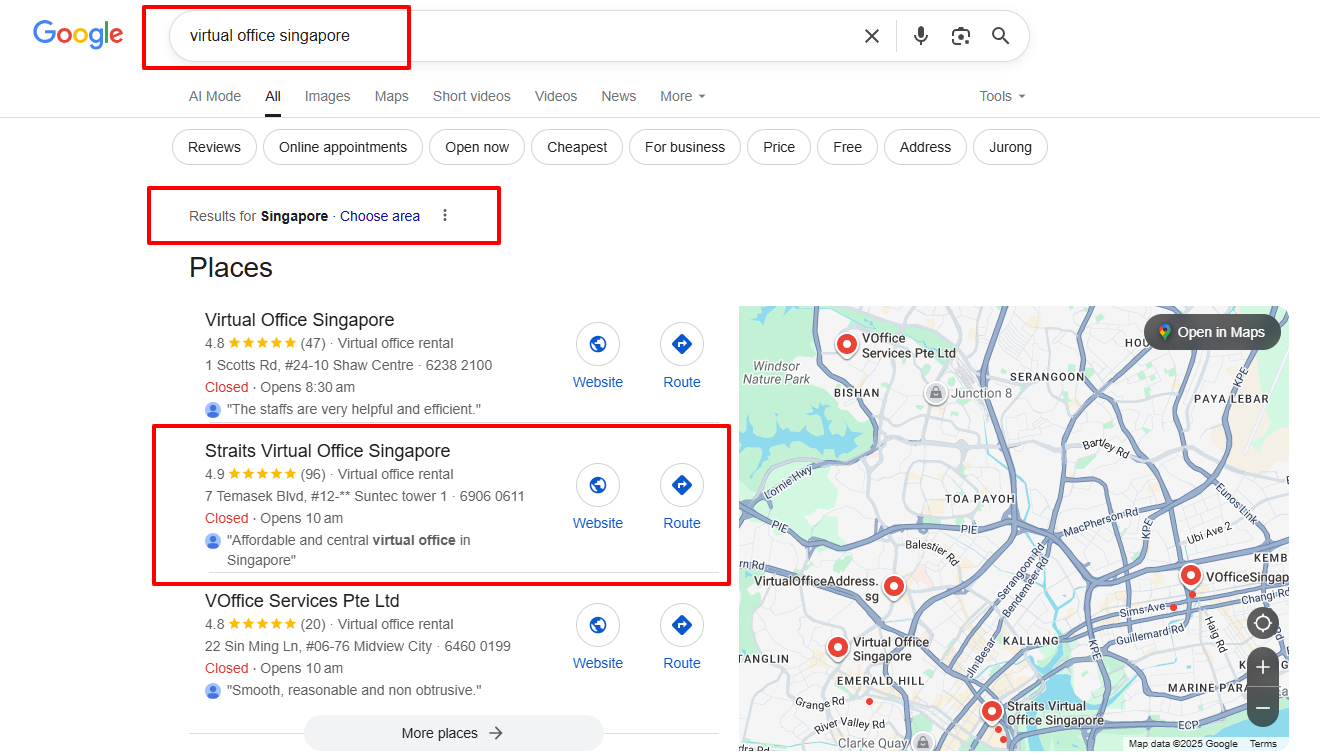
A virtual office provider in Singapore, with its own office in Suntec Tower, reached second place in the map pack for “virtual office singapore”, a competitive search in a dense city center. This is a different website from the same client’s exact match domain, which ranked second in the regular results, as shown on my SEO case studies page.
For a medical clinic in Maryland, the same Business Profile work led to 2,306 profile interactions, including 819 calls and 606 direction requests. The full steps are in my service area business case studies and my healthcare SEO case study.
Frequently Asked Questions
How long does it take to rank higher on Google Maps?
Usually a few months. In my service-business projects, the 3-Pack took about three months. Fixing your category and profile details can help sooner, while reviews and links build over time.
Can I rank on Google Maps without a physical address?
Yes, if you serve customers at their location. Hide your address and set service areas in your Business Profile. You still need a real address for verification.
Can I rank in a city where I have no location?
It is hard, because distance is one of Google’s three main factors. You can still appear for searches in nearby areas you serve, especially with a strong profile and a location page for that area.
Do Google Business Profile posts help rankings?
Google has not confirmed that they do. Posts can still help customers by showing offers, updates and recent work.
Final Thoughts
Ranking higher on Google Maps comes down to Google’s three factors. Make your profile as relevant as possible, work with distance honestly, and build prominence through reviews, consistent listings and local links. None of it costs money, but all of it rewards steady work.
If you want help ranking your business on Google Maps, contact me, or see more results on my SEO case studies page.

SEO consultant with 11+ years of experience helping e-commerce, legal, medical, and local service businesses in 30+ countries, mostly the US, UK, Canada, and Australia, get found on Google, Bing, and AI search engines like ChatGPT, Perplexity, and Claude. Every case study on this site uses real data from the project’s Google Search Console, Analytics, or Semrush. Learn more about me, read my SEO case studies, or work with me.

